R-Type Server Documentation
Table of Contents
- Introduction
- Quick Start
- General Architecture
- Connection Management
- Lobby System
- Game Loop
- Entity Component System (ECS)
- Threading Model
- Configuration
- Administration (RCON)
- Login/Registration
- Error Handling
- Performance Considerations
1. Introduction
1.1 Overview
The R-Type Server is a dedicated authoritative game server designed to host multiplayer sessions of the R-Type game. It acts as the single source of truth for the game state, ensuring fair play and synchronized experiences across all connected clients.
The server follows a client-server architecture where:
- The server owns and manages all game logic, physics, and state
- Clients send inputs and receive state updates to render the game
1.2 Key Features
| Feature | Description |
|---|---|
| Authoritative Game State | Server validates all actions, preventing cheating |
| Multi-Lobby Support | Multiple concurrent game sessions with isolation |
| Player Authentication | Account system with login/register functionality |
| Persistent Progression | Score tracking and leaderboard via database |
| Remote Administration | RCON system for server management |
| Configurable Gameplay | Wave difficulty and enemy patterns via config files |
| Scalable Threading | Thread pool for concurrent game instances |
1.3 System Requirements
- OS: Linux
- Network: UDP port availability (configurable)
- Storage: SQLite database for account persistence
- Memory: Scales with number of concurrent lobbies
1.4 High-Level Architecture
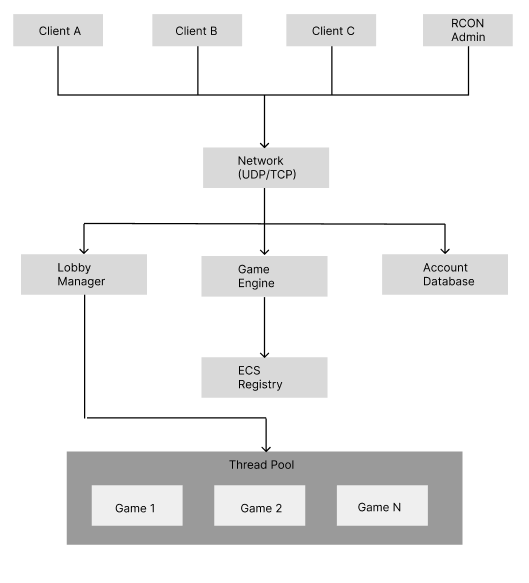
2. Quick Start
2.1 Compilation
Build the server using the project’s Makefile:
# Debug build
make server

# Release build
make release
The compiled binary will be available as r-type_server in the project root.
2.2 Server Launch
The server requires a port to be specified at launch:
./r-type_server -p <port> [-t <tickrate>] [-d]
| Argument | Required | Description | Default |
|---|---|---|---|
-p <port> | Yes | UDP port to listen on | - |
-t <tickrate> | No | Game updates per second (1-120) | 60 |
-d | No | Enable debug logging | Disabled |
Examples:
# Start server on port 4242 with default settings
./r-type_server -p 4242

# Start with 30 tick rate and debug logging
./r-type_server -p 4242 -t 30 -d

# Production setup with 120 ticks
./r-type_server -p 8080 -t 120
2.3 Verifying Server Status
On successful startup, the server will:
- Load or generate the RCON configuration
- Initialize the account database
- Begin listening for client connections
- Display the listening port in logs
Use the RCON client to verify the server is responding (see Administration).
3. General Architecture
3.1 Modular Design
The server is built with a modular architecture, separating concerns into distinct layers:
┌─────────────────────────────────────────────────────────┐
│                    Presentation Layer                   │
│              (Packet Serialization/Parsing)             │
├─────────────────────────────────────────────────────────┤
│                    Application Layer                    │
│         (Executors, Lobby Manager, Game Logic)          │
├─────────────────────────────────────────────────────────┤
│                     Domain Layer                        │
│            (ECS, Entities, Components, Systems)         │
├─────────────────────────────────────────────────────────┤
│                  Infrastructure Layer                   │
│           (Network, Database, Configuration)            │
└─────────────────────────────────────────────────────────┘
3.2 Core Modules
| Module | Responsibility |
|---|---|
| RType | Application entry point, initialization orchestrator |
| RTypeServer | Network server, client lifecycle management |
| LobbyManager | Lobby creation, joining, and lifecycle |
| Game | Game session logic, tick loop, win/lose conditions |
| Registry (ECS) | Entity and component storage, system execution |
| AccountDatabase | Persistent storage for accounts and scores |
| ThreadPool | Concurrent game execution management |
3.3 Data Flow
The server processes data through a well-defined pipeline:
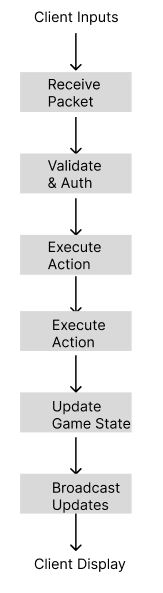
Flow Description:
- Receive: Network layer receives UDP/TCP packets from clients
- Validate: Packet executor checks authentication and permissions
- Execute: Action is processed (input, lobby action, etc.)
- Update: Game state is modified in the ECS registry
- Broadcast: State changes are sent to all relevant clients
4. Connection Management
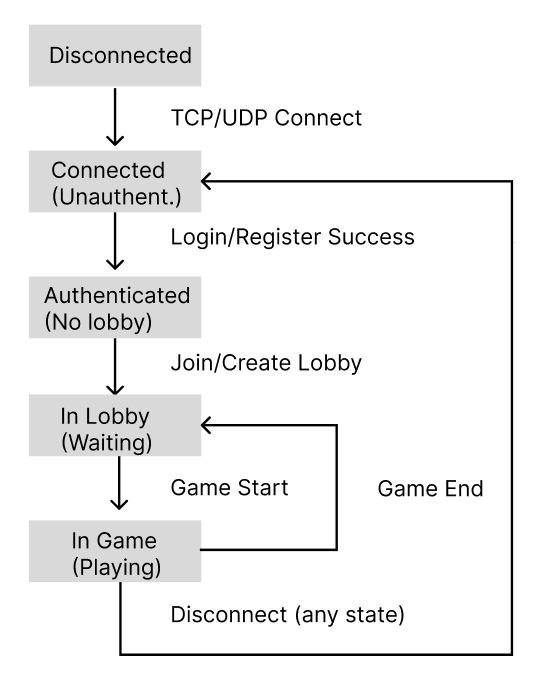
4.1 Client Lifecycle
A client goes through several states during its connection to the server:
4.2 Authentication System
The server implements a two-phase authentication:
Phase 1 - Whitelist Mode (Unauthenticated)
Before authentication, clients can only send:
- Login requests
- Registration requests
- RCON commands (with valid key)
All other packets are rejected.
Phase 2 - Full Access (Authenticated)
After successful login, clients gain access to:
- Lobby operations (create, join, leave)
- Game actions (start, input, chat)
- Score updates
4.3 Authentication Flow
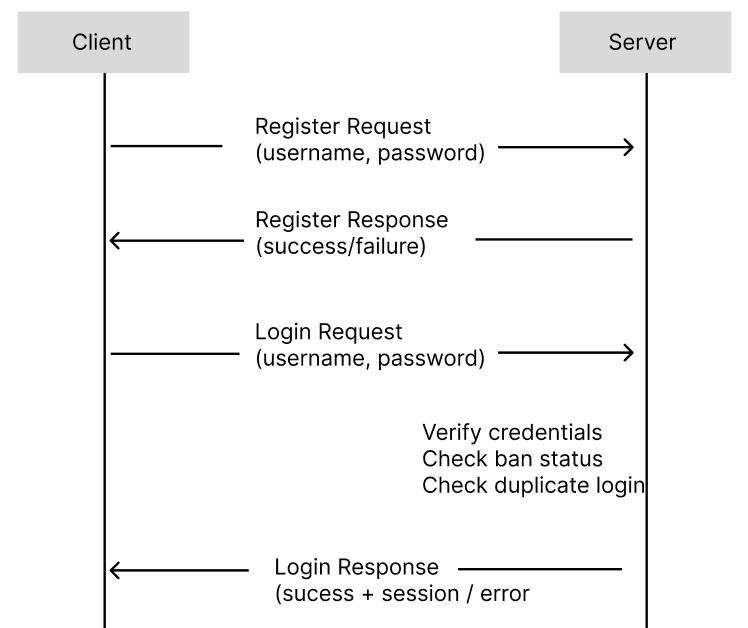
4.4 Disconnection Handling
When a client disconnects (gracefully or unexpectedly):
- Player Removal: Removed from current lobby
- Entity Cleanup: Player entity destroyed in ECS (if in game)
- Notification: Other players notified via destroy packet
- Resource Cleanup: Network resources freed
The server handles abrupt disconnections through timeout detection.
5. Lobby System
5.1 Concept
Lobbies are isolated waiting rooms where players gather before starting a game. Each lobby:
- Has a unique 6-character identifier
- Can hold 1 to 5 players
- Operates independently from other lobbies
- Owns its game instance when playing
5.2 Lobby Types
| Type | Visibility | Join Method | Use Case |
|---|---|---|---|
| Public | Listed | Auto-matchmaking | Quick play with strangers |
| Private | Hidden | Code sharing | Playing with friends |
Lobby Code Format:
Valid characters: 1-9, a-z, A-Z
Example: "K7MN2P"
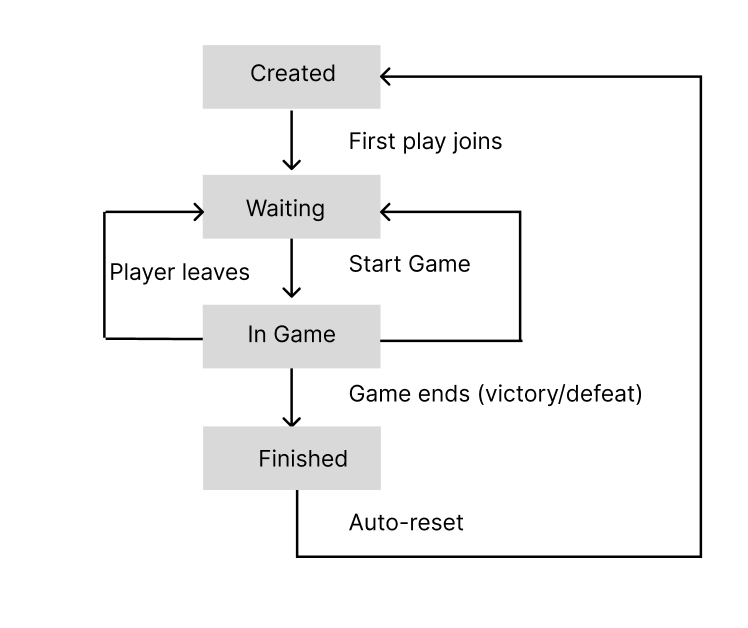
5.3 Lobby Lifecycle
5.4 Player Management
Joining a Lobby:
Player Request              Server Action

Join Public       ────>     Find/create public lobby with space
Join Private      ────>     Create new private lobby, return code
Join with Code    ────>     Find lobby by code, verify space
Leaving a Lobby:
- During waiting: Player removed, others notified
- During game: Player entity destroyed, game continues
- Last player leaves: Lobby destroyed (if empty)
5.5 Constraints
| Constraint | Value | Reason |
|---|---|---|
| Min players | 1 | Single-player allowed |
| Max players | 5 | Game balance, network bandwidth |
| Code length | 6 | Collision avoidance, easy sharing |
6. Game Loop
6.1 Tick Rate System
The server operates on a fixed timestep model:
Tick Rate: Number of game updates per second
Default: 60 ticks/second = 16.67ms per tick
Range: 1-120 ticks/second
Why Fixed Timestep?
- Deterministic physics simulation
- Consistent gameplay across different hardware
- Predictable network update frequency
6.2 Tick Execution Order
Each tick follows a precise execution order:
                      TICK START:

  1. Time Synchronization
     - Send current server time to all clients

  2. Network Flush
     - Send all queued packets from previous tick

  3. ECS Systems Update
     - Position System (velocity → position)
     - Pattern System (enemy patterns)
     - Collision System (hitbox detection)
     - Health System (damage application)
     - Boundary System (out-of-bounds cleanup)

  4. Gameplay Update
     - Wave management (spawn enemies)
     - Win/Lose condition check
     - Score updates

  5. State Broadcast
     - Position updates for moved entities
     - Destroy packets for dead entities
     - New entity packets for spawns

  6. Wait for Next Tick
     - Sleep until tick duration elapsed

                       TICK END
6.3 Wave System
Games progress through configurable waves of increasing difficulty:
Wave Properties:
- Difficulty level
- Enemy count and types
- Boss configuration (HP, patterns, size)
- Wait time between waves
6.4 Win/Lose Conditions
| Condition | Trigger | Result |
|---|---|---|
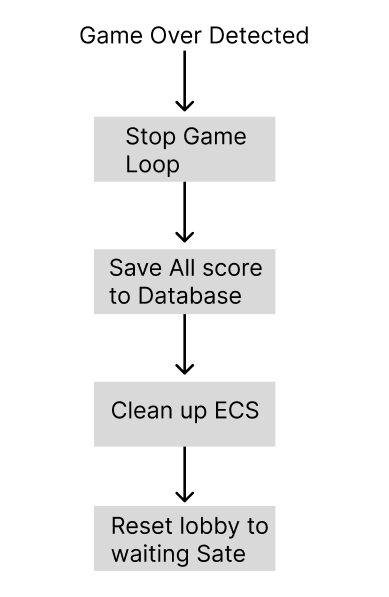
| Victory | All waves completed | Scores saved, return to lobby |
| Defeat | All players dead | Scores saved, return to lobby |
6.5 End Game Flow
7. Entity Component System (ECS)
7.1 Overview
The server uses an Entity Component System architecture for game object management. This pattern provides:
- Performance: Cache-friendly data layouts
- Flexibility: Compose behaviors through components
- Maintainability: Decoupled systems and data
7.2 Server-Managed Entities
| Entity Type | Description | Authority |
|---|---|---|
| Player | Human-controlled spaceship | Server (validates inputs) |
| Laser | Player projectile | Server (spawned on input) |
| Enemy | AI-controlled hostile | Server (full control) |
| Boss | Large enemy with patterns | Server (full control) |
| Boss Bullet | Enemy projectile | Server (pattern-based) |
7.3 Component Catalog
Transform Components:
| Component | Data | Purpose |
|---|---|---|
| Position | x, y coordinates | Entity location in world |
| Velocity | dx, dy values | Movement speed and direction |
| Acceleration | ax, ay values | Velocity change over time |
Combat Components:
| Component | Data | Purpose |
|---|---|---|
| Health | current, max HP | Damage tracking |
| HitBox | width, height | Collision boundaries |
| Damager | damage value | Damage dealt on contact |
| Resistance | reduction % | Damage mitigation |
| Hitable | flag | Can receive damage |
Behavior Components:
| Component | Data | Purpose |
|---|---|---|
| Pattern | pattern type, params | Enemy movement/attack pattern |
| Tag | entity type enum | Entity classification |
| Dependence | parent entity ID | Lifecycle linking |
| OutsideBoundaries | flag | Cleanup when off-screen |
7.4 System Execution Pipeline
Systems run in a specific order each tick:
                 System Execution Order

  1. POSITION SYSTEM
     Input:  Velocity, Acceleration, Position
     Output: Updated Position

  2. PATTERN SYSTEM
     Input:  Pattern, Position
     Output: Updated enemies positions

  3. LASER SYSTEM
     Input:  Laser, Position
     Output: Updated laser entities
     Logic:  Move lasers, check lifetime

  4. COLLISION SYSTEM
     Input:  Position, HitBox, Hitable
     Output: Collision events
     Logic:  AABB intersection detection

  5. HEALTH SYSTEM
     Input:  Health, Collision events, Damager
     Output: Updated Health, Death events
     Logic:  Apply damage, check death

  6. LOOSE SYSTEM
     Input:  Player entities, Health
     Output: Game over flag
     Logic:  Check if all players dead
7.5 Entity Factories
Factories ensure consistent entity creation:
Player Factory:
Creates: Player entity + associated Laser entity
Components: Position, Health, HitBox, Tag, Laser reference
Boss Factory:
Creates: Boss entity with configured stats
Components: Position, Health (from config), HitBox (from config),
            Pattern, Damager, Velocity
Bullet Factory:
Creates: Projectile with pattern-based movement
Components: Position, Velocity, Damager, HitBox, OutsideBoundaries
8. Threading Model
8.1 Thread Architecture
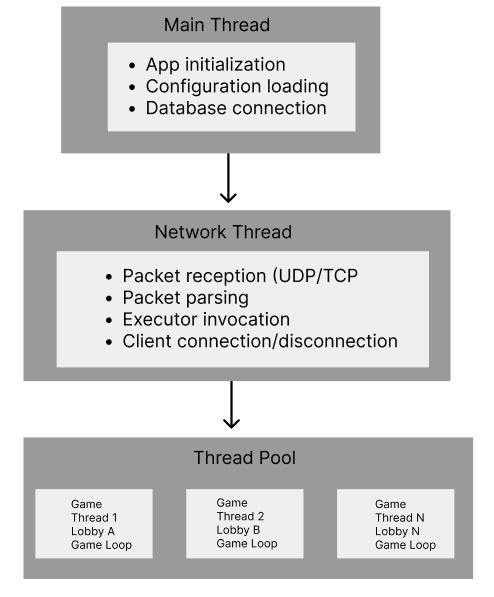
The server uses a multi-threaded architecture to handle concurrent operations:
8.2 Thread Responsibilities
| Thread | Responsibility | Blocking Allowed |
|---|---|---|
| Main | Init, shutdown, signals | No |
| Network | I/O, packet routing | Yes (I/O wait) |
| Game (pool) | Game loop, ECS update | Yes (tick sleep) |
8.3 Game Isolation
Each game runs in complete isolation:
Benefits:
- Game A crash doesn’t affect Game B
- No synchronization needed between games
- Performance gain
8.4 Synchronization Mechanisms
Critical sections protected by mutexes:
| Mutex | Protects | Contention Level |
|---|---|---|
_playersMutex | Player list in lobby | Medium |
_registryMutex | ECS registry access | High (in-game) |
_lobbiesMutex | Lobby collection | Low |
_runningMutex | Game running state | Low |
Best Practices Applied:
- Minimize critical section duration
- Avoid nested locks (deadlock prevention)
- Use RAII lock guards
9. Configuration
9.1 Gameplay Configuration
File: ./server/config.cfg
Defines wave progression and difficulty:
┌─────────────────────────────────────────────────────────────┐
│                      config.cfg                             │
├─────────────────────────────────────────────────────────────┤
│                                                             │
│  waves = (                                                  │
│    {                                                        │
│      difficulty = 1                                         │
│      pattern = "SPIRAL"                                     │
│      boss_hp = 100                                          │
│      boss_size = { width = 64, height = 64 }                │
│      enemy_count = 5                                        │
│      wait_time = 3.0                                        │
│    },                                                       │
│    {                                                        │
│      difficulty = 2                                         │
│      pattern = "RADIAL_BURST"                               │
│      ...                                                    │
│    },                                                       │
│    ...                                                      │
│  )                                                          │
│                                                             │
└─────────────────────────────────────────────────────────────┘
9.2 Wave Parameters
| Parameter | Type | Description |
|---|---|---|
difficulty | Integer | Difficulty multiplier (1-3+) |
pattern | String | Enemy attack pattern |
boss_hp | Integer | Boss health points |
boss_size | Object | Boss hitbox dimensions |
boss_damage | Integer | Damage dealt by boss |
boss_speed | Float | Boss movement speed |
enemy_count | Integer | Number of enemies in wave |
wait_time | Float | Seconds before wave starts |
9.3 Available Patterns
| Pattern | Behavior |
|---|---|
SPIRAL | Bullets spiral outward |
RADIAL_BURST | Bullets explode in all directions |
AIMED_SHOT | Bullets target player position |
WAVE_SPREAD | Bullets in wave formation |
FLOWER | Flower-shaped bullet pattern |
DOUBLE_SPIRAL | Two interleaved spirals |
10. Administration (RCON)
10.1 Overview
RCON (Remote Console) allows administrators to manage the server without direct access.
10.2 Authentication
RCON uses a shared secret authentication:
- Server generates
RCON_KEYon first startup - Key stored in
rtype.cfg - Admin must provide key with each command
- Invalid key = command rejected
10.3 Available Commands
| Command | Syntax | Description |
|---|---|---|
LIST | LIST | Show all connected players |
KICK | KICK <username> | Disconnect a player immediately |
BAN | BAN <username> | Ban account (prevents future logins) |
UNBAN | UNBAN <username> | Remove ban from account |
BANLIST | BANLIST | List all banned accounts |
11. Login/Registration
12. Error Handling
12.1 Logging System
Debug Mode (-d flag) enables verbose logging:
[TIMESTAMP] [MODULE] Message
─────────────────────────────────────
[12:34:56] [NETWORK]    Client connected: 192.168.1.10
12.2 Graceful Degradation
| Scenario | Server Response |
|---|---|
| Client timeout | Remove from lobby, notify others |
| Database unavailable | Reject new registrations, allow cached logins |
| Game thread crash | Terminate lobby, preserve other games |
| Invalid packet | Ignore, log warning |
13. Performance Considerations
13.1 Scalability
Horizontal Scaling (Lobbies):
Factors limiting concurrent lobbies:
- Available CPU threads
- Memory per game instance
- Network bandwidth
13.2 Network Optimization
Packet Batching:
Instead of sending immediately, packets are queued and flushed once per tick:
Benefits:
- Reduced packet overhead
- Better bandwidth utilization
- Predictable network load
See Also
- Network Protocol (RFC) - Detailed packet specifications
- Client Documentation - Client-side architecture
- ECS Development Guide - Working with the ECS framework