Client Documentation
Summary
The client represent the playable part of the project.
A client must connect to a given running server to work.
It has a Graphical User Interface to allow a human to play the game.
Architecture
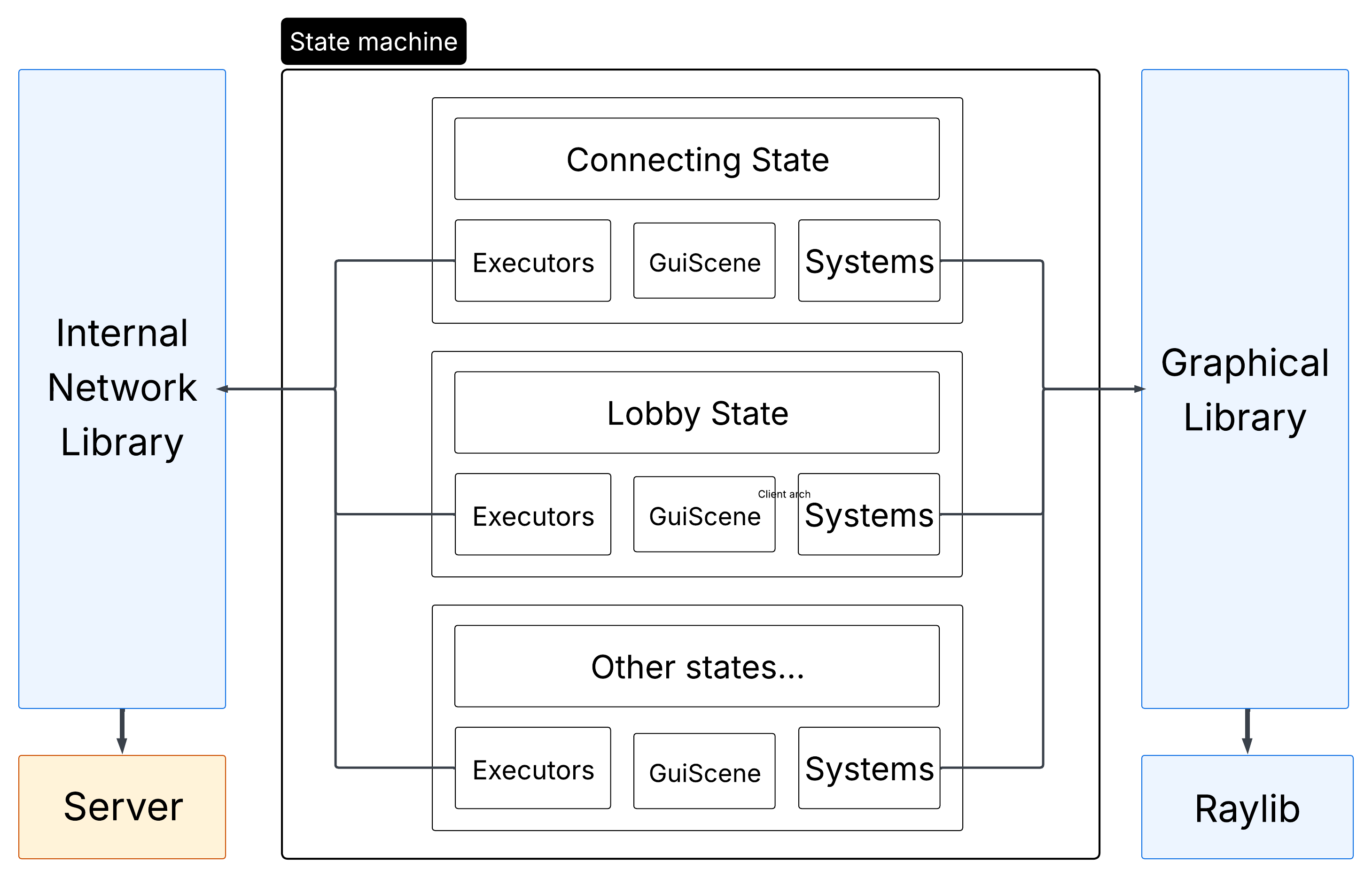
The client is composed of two parts:
- The State Machine
This is where all of the logic and rendering happen. - The Network
This is where all communications with the server happen.
The client is not responsible to determine anything except for user inputs.
The position of the player is even determined by the server itself.
State Machine
The client works with a state machine.
It must be initialized with a base state.
If a state decides it needs to switch to another state, it should call the switch_state method with the new state.
Every state need to implement an init_systems and init_entities method.
As the name suggests, they allow the init of systems and entities.
You should also reset the registry if needed, as well as the network executors.
An end state exists, and if switched to it, the program will stop. It can be used to end the game.
A state can have a gl::GuiScene. It should be instanciated in the init_systems call.
This gui scene will be rendered after the main registry renderers are called.
The base states are the following:
Connection state
Inside the connection state, the client is preparing the connections with the server.
It first connect with a TCP socket, and then setups a UDP connection (and this is where the loading time arise).
It is separated from the rest to forbid interaction while this crucial step is still processing.
The client also loads any images into GPU memory while this step is processing.
The client is then sent to the login page
Login state
The client need to login to the server before doing anything.
This is done in the login state.
He can choose between login and registering a new account.
Error messages are shown on top of the login/register boxes.
After login, the client is sent to the main menu;
Menu state
Inside the main menu, the client can choose to:
- Access the settings page.
- Join a random game, create one, see informations.
Inside the menu, the player can join lobbies.
He can choose between creating or joining a random lobby, creating a private one or joining a specific lobby.
He can also see the scoreboard of the game, with the top 10 players on the server.
Settings state
Here you can choose your keybinds, or toggle the red-daltonian filter.
You can go back to the main menu from there.
Lobby state
Before a game, you are sent to a lobby.
This is where you wait for your friends to connect to join the game together.
Inside the lobby, you have the possibility to request the start of the game, and force every player in the lobby to switch to the game state.
You can also chat with you friends in the lobby.
You can set the game settings, such as difficulty and number of lives.
When the game starts, you are sent in the game screen
Game state
Finally, the real state. The one where you can play.
Here you have the possibility to see other players, enemies, bullets and, of course, to interact and play the game with you controls.
You also have access to the chat.
You see the list of players and your number of heart remaining.
At the end, you are propulsed in the end states.
Win Lost state
The end screens !
You see either that you won, or that you lost.
After that you can go back to the main menu to see the scoreboard !
Composition of each state
We are using an Entity Component System to make the game work. Both rendering and logic parts are using this ECS.
Given that, every state has it’s own separated entities, components and systems.
For example, the game state has a system dedicated to showing a bullet on the screen, whilst the connecting state really don’t have any bullets !
Network
The client utilizes network in an extensive manner, as it needs it for almost everything !
Indeed, almost nothing is determined by the client itself for now, and it is uncapable of even computing the position of the player.
Thus, it needs to receive those informations from the server.
We can differentiate three kind of communication between the server and the client :
- Mandatory connection communications
This include the authentification of the UDP socket for example. - Ponctual events
For example, when a player is killed, or an enemy spawns. - Continuous datastream
For example, player and enemy positions, player inputs.
The architecture with executors that totally abstracts differentiation between types of packet make it fairly easy to understand how to implement a reaction to a given packet.
Managers
- Client Manager
The client itself is manager through aClientManager.
This class creates all the necessary subclasses and managers to launch the game, connect to the server and close everything without memory leaks.
It hosts the principal game loop and the state machine, and calls the subsequent update and render methods from a given state. It is responsible for the state change, although determined by the state themselves. - Network Manager
The network manager inits the network thread. Inside this thread runs the network main loop, in change of calling the network library methods to connect to the server, poll events and send them.
This manager also handles request of deconnections.
Graphical library
For our graphical library, we chose Raylib.
It offers multiple advantages compared to other libraries:
- SFML
- The raylib offers a higher level management of operations, with a lot of underlying global variables, offering nice and straightforward function calls.
- The SFML, although having the nice advantage of being adapted to Object Oriented Programming, tends to be more difficult to use because of the need to keep track of all variables created. It may be preferable to have the variables in hand, but in our case with the ECS and state machine, we chose to have hidden variables.
- SDL
- The SDL is a low-level graphical library. We did not wanted to go too deep in that rabbit hole, and we stuck to the Raylib, offering higher level implementation.
- Direct OpenGl calls
- I’m not even gonna explain why we did not chose that path.
The Raylib is a really good graphical library, but we may encounter some problem with it, namely :
- It is not really adapted to Object Oriented Programming.
Indeed, it is not at all constructed with classes, and rely solely on direct calls to global funtions.
We abstracted it away in our own graphical library definition.
Diagrams
Client architecture diagram